
Understand the locks on your books
Review reversible closing dates, filed-tax protection and permanent hard locks.
Closing your books in System Settings shows which dates are protected against changes. Review the current status before deciding whether a transaction can be changed.
- Open Settings, then System Settings.
- Find Closing your books and read the current lock status.
- Review the closing date, Filed VAT periods and Hard lock separately.
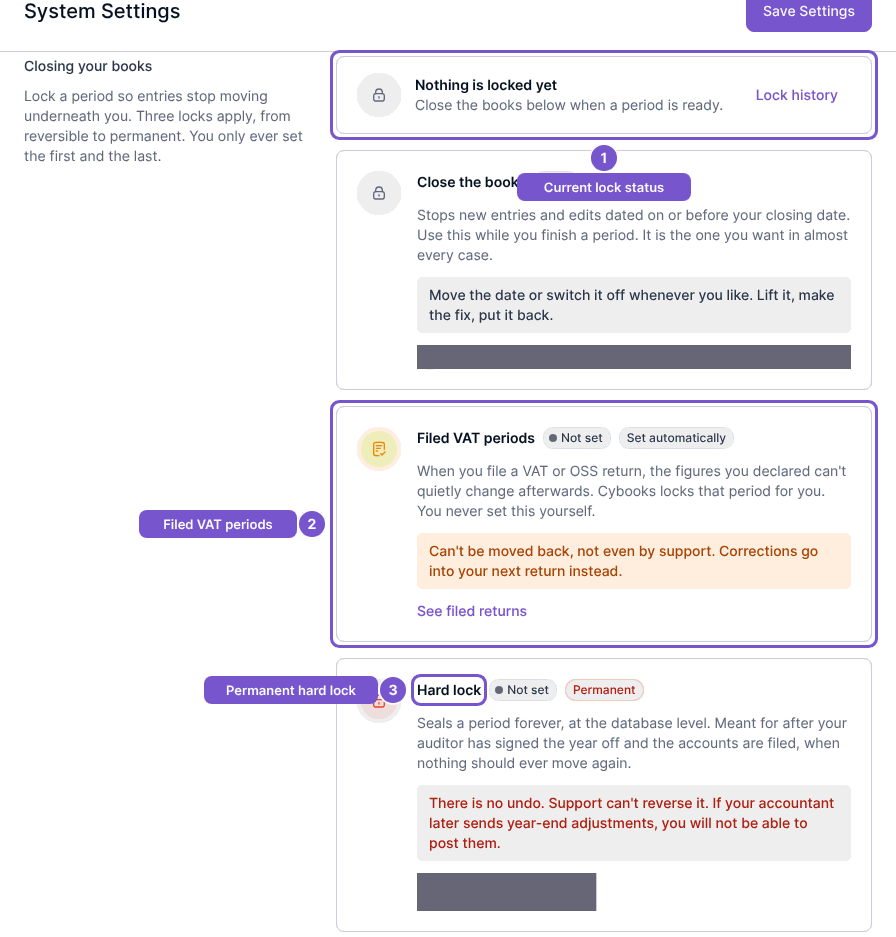
What each lock means
The ordinary closing date is reversible for users allowed to manage period locks. Filed VAT periods reflects protection set by VAT or OSS filing; this floor is not something you clear in Close Books. Hard lock is permanent and can only move forward.
A hard lock has no undo. Confirm that all intended adjustments are complete with your accountant before considering one. Moving or clearing an ordinary closing date cannot override a filed-tax or hard-lock floor.
Opening this panel only reads the effective locks. If an entry remains blocked after you review the closing date, check the stronger filed-tax and hard-lock protections instead of repeatedly changing the ordinary date.