
Review a partial invoice payment
Choose how to handle the balance left on an invoice before saving its match.
When a payment does not settle the selected invoice, Cybooks asks what happened to the remaining balance.
Choose the remaining-balance treatment
- Open the bank account, choose To review and open the incoming payment.
- In Match, select the invoice and compare its open amount with this payment.
- Review the remaining-balance choices. Leave it open keeps the unpaid amount owing. Close it as a cost writes off the remainder when you have the required access and supply its reason. Split across records is for a payment covering more than one record.
- Check the consequence and any requested Reason before using the final save action.
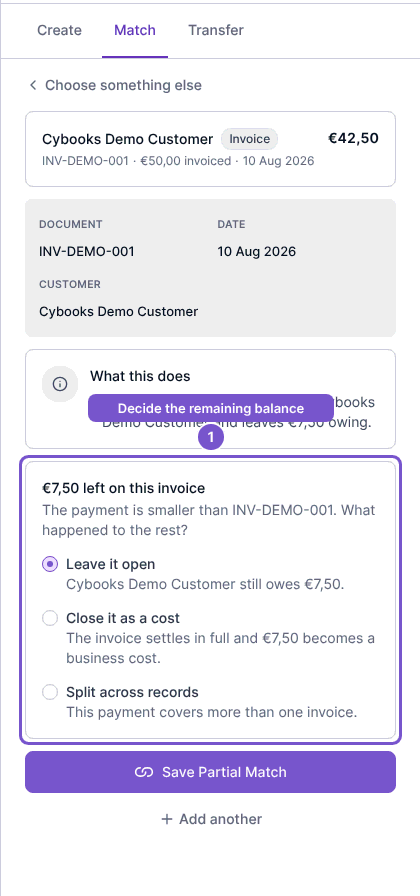
Choosing an invoice or a reason is a review step. The selected accounting consequence is applied only when the match is finalized; do not use a write-off merely to make the amounts agree.