
Understand a blocked bank change in a closed period
Use the closing-date message to identify why a bank action was refused.
Cybooks can refuse a bank change when the affected record is inside a closed accounting period. The rejected action does not change the ledger.
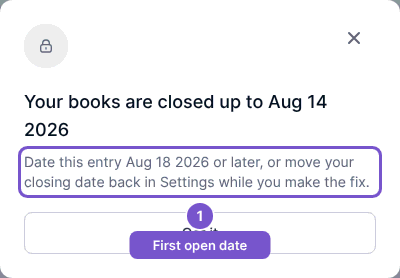
Read the closing-date message
- When the action is blocked, read Your books are closed up to and the date shown.
- Check the next permitted entry date in the message. The dates depend on your company's current lock.
- Close the message with Got it and review the affected record before attempting another change.
Do not assume an undo or removal succeeded after this message. If changing the closing date is appropriate, the person responsible for the books must review that separately in Settings; dismissing the dialog does not reopen a period.