
Disconnect a bank feed or archive a manual account
Review preserved records before disconnecting a feed or archiving a manual account.
Disconnecting stops imports from a bank feed and removes the account from your active Bank Accounts list. Imported transactions and accounting records remain in Cybooks.
Review and disconnect
- Open Bank Accounts and find the account you want to disconnect.
- Select Disconnect bank feed for that account.
- Check the account name and the preservation summary, including imported transactions and linked records.
- If you want to proceed, select the checkbox confirming that imports will stop, then select Disconnect bank feed.
- Wait for Cybooks to report the outcome. Use Cancel to leave the account connected before confirming.
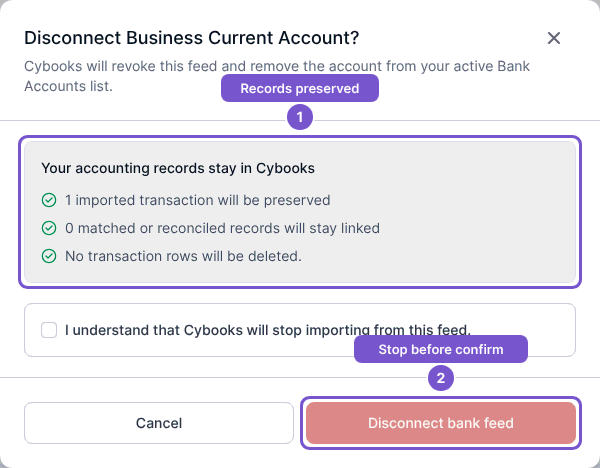
If the preview cannot be loaded, confirmation is unavailable. If the account changes or the confirmation expires, reopen the dialog to obtain a fresh preview instead of relying on the earlier one.
Archive a manual account
- In Bank Accounts, find the manual account and select Archive account.
- Check the account name and preservation summary. Archiving removes the manual account from your active list; it does not revoke a provider feed.
- Select the checkbox confirming that the account will leave your active list, then select Archive account. Select Cancel to keep it active.
- Review the result before treating the account as archived. Imported transaction rows and linked accounting records remain in Cybooks.
Both actions require a current preservation preview and your acknowledgement. A feed disconnect can continue while the provider operation completes; manual account archiving does not require that provider step.