
Understand bank-feed access and refreshes
Review the connection guide and find the refresh status for a connected account.
The bank connection guide explains what happens when you connect a supported bank feed.
- Choose your bank provider from the connection page.
- Approve read-only access with the provider.
- Return to Cybooks after authorization.
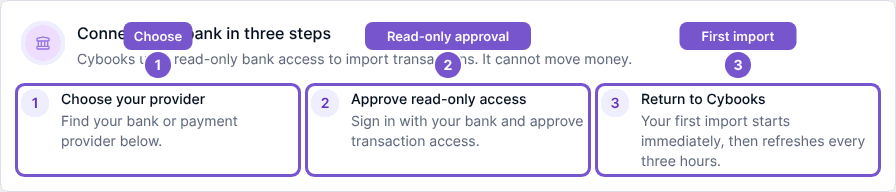
This access lets Cybooks import account information and transactions; it cannot move money. The first import is queued immediately after connection, and recurring imports run every three hours. A queued import is not a promise that all provider data is already visible.
Check a connected feed
Open the bank account and review its feed status and last-updated information. Refresh now requests another transaction refresh when your role allows updates. Wait for the refresh and review the resulting feed; repeatedly pressing the action does not make the provider's data available sooner.
If the feed is marked stopped, review the stopped-feed guidance and connection status. If Refresh now is unavailable, ask an administrator to check your account-update access.