
Review bank rules and prepare a new rule
Inspect rule conditions and categorization settings before saving a bank rule.
Bank rules apply to unreviewed transactions. Use them carefully because their conditions and settings determine which transactions they match and how those transactions are categorized.
- Open Bank Rules from Bank Accounts and review the existing rules, their priorities and the accounts they apply to.
- Choose New rule to open Create rule.
- Give the rule a recognizable name, select the money direction and account scope, and enter the matching conditions.
- Review whether All conditions or another offered combination is appropriate. Use Test Rule to inspect matching before committing the rule.
- Review the resulting account, tax, payee and memo settings. Check Auto add separately: it is the automatic-confirmation choice.
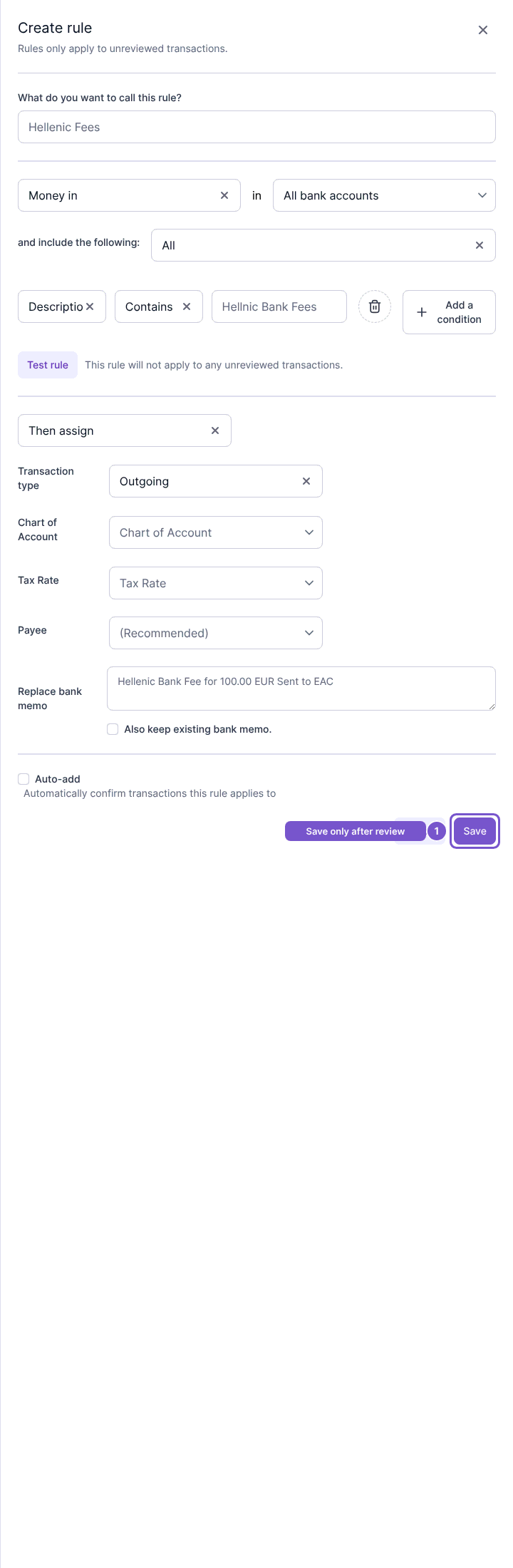
Opening the form does not save a rule or categorize a transaction. Save submits the rule's settings. Review the match scope and accounting assignments before saving, especially with automatic confirmation enabled. Editing and deleting existing rules require their own access.